Stop training. Start doing.
Certifications tell you what someone knows. Skill Labs prove what they can do.
Hands-on lab experiences built directly into myACI training to reinforce learning and develop job-ready IT and cybersecurity skills.

Browser-based
No downloads

Instant access
Launch in seconds

Reset & retry
Practice with confidence

Safe environments
Isolated. Secure. Always-on.


Knowledge becomes capability
Doing the work is what builds skills. Skill Labs put your team inside real environments—the same tools, the same systems, the same pressure—so when something breaks at work, they've already fixed it.
92%
OF EMPLOYERS
90%
OF LEARNERS

Cybersecurity Awareness Month:
Save 25% on AI Courses with Skill Labs
Practice AI workflows in safe, guided environments — writing prompts, analyzing outputs, automating tasks, and applying security controls in job-based scenarios.
Save 25% on ITPro for teams with code CYBERMONTH25 — ends October 31.
Available Now:
- CompTIA SecAI+ (CY0-001)
- AI Essentials
- Prompting for AI in Cybersecurity Engineering
Close IT and cybersecurity skill gaps with hands-on learning
Skill Labs help organizations build practical skills, reinforce certification training, validate competency, and reduce risk through guided, real-world practice.
What your team can do in Skill Labs
Technical depth. Hands-on results. Practice across technologies and platforms your team uses every day
Configure and troubleshoot networks
Work with real devices and simulations to build network and infrastructure skills.
Respond to cybersecurity threats
Investigate attacks, analyze data, and strengthen your team's security posture.
Explore and master cloud platforms
Practice in AWS, Azure, and other cloud environments with real-world scenarios.
Build confidence in IT support tasks
Solve everyday IT challenges like password resets, patching, and ticket resolution.
Inside every Skill Lab
Everything your team needs to practice, learn, and build real-world skills
With over 1,000 Skill Labs spanning leading technologies and certification pathways, your team can practice the skills they need most. From Microsoft and AWS to Cisco, Linux, CompTIA, and cybersecurity tools, learners gain hands-on experience in environments that mirror real-world work.

Real Environments
The real thing, safely
- Access real virtual machines, cloud sandboxes, and network simulations.
- Example: Windows Server, Linux, AWS, Cisco, and more.

Instant Access
Ready when they are
- Launch labs in seconds—no downloads or installations.
- Works in any modern browser.

Guided Practice
Structure that builds confidence
- Step-by-step instructions and objectives help learners stay on track and complete tasks.
- Retry anytime and practice with confidence.
Skill Labs are built into the learning experience
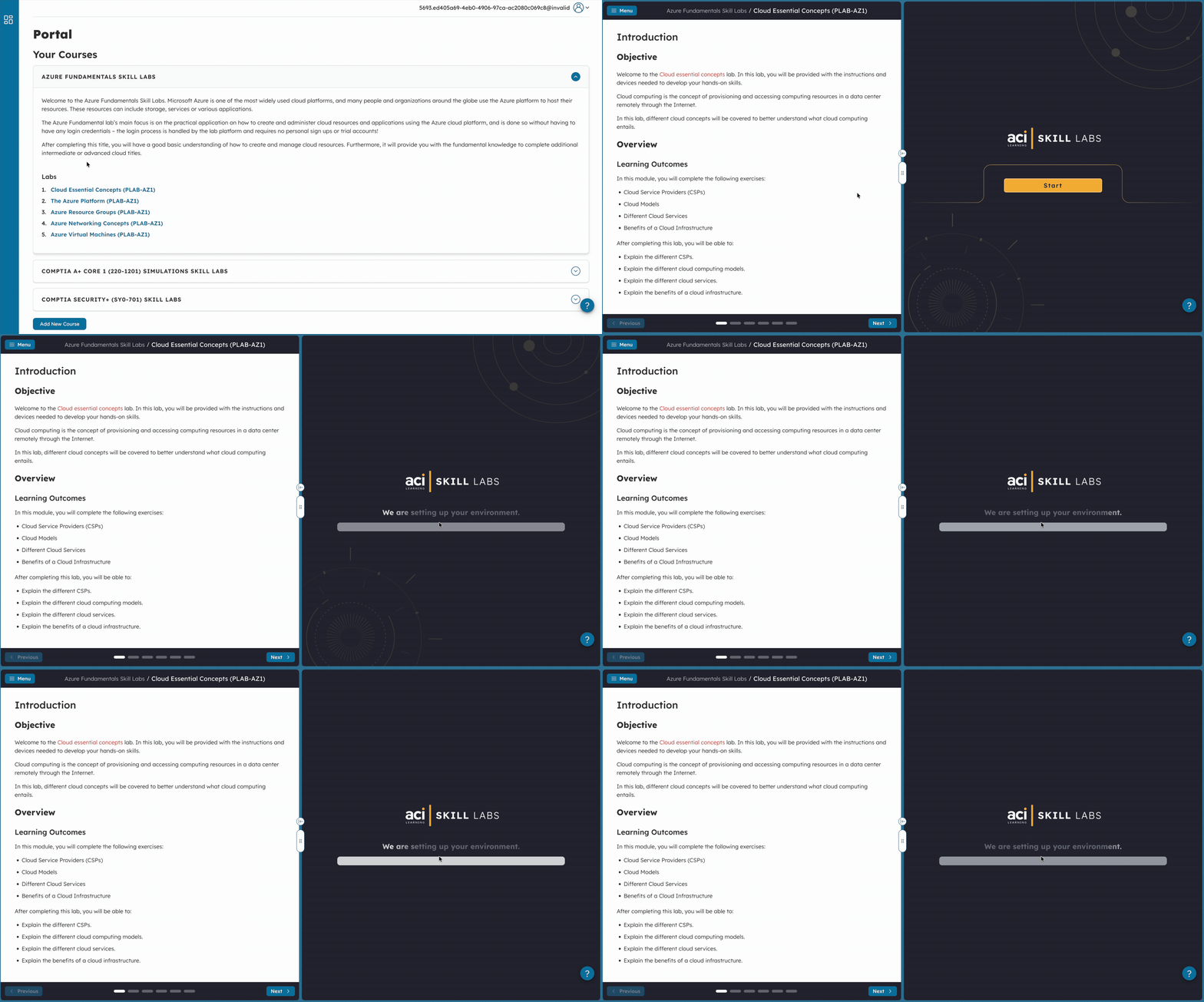
Skill Labs are integrated throughout myACI courses and learning paths, allowing learners to move seamlessly between instruction and hands-on practice.
Learners can:
- Watch training
- Launch labs directly from courses
- Complete guided exercises
- Reinforce certification objectives
- Demonstrate practical competency
Skill Labs for IT & Cybersecurity Roles
Labs across the technologies you use every day
From cybersecurity and cloud to networking and IT support, discover hands-on labs aligned to today's most in-demand technologies.
Browse our most popular labs:
Applied AI Skills and Workflow Design
 Labs:6
Cisco CCNA (200-301)
Labs:22CompTIA A+ (220-1201)
Labs:26CompTIA A+ (220-1202)
Labs:30CompTIA Network+ (N10-009)
Labs:17CompTIA SecAI+ (CY0-001)
Labs:17CompTIA Tech+ (FC0-U71)
Labs:17Digital Literacy
Labs:18Foundational AI Literacy
Labs:7Front End Web Development
Labs:10Interconnecting Cisco Networking Devices (ICND1 v3.0)
Labs:19Introduction to Networking Fundamentals
Labs:13Real virtual machines, real skills.
Learn in a true-to-work environment
Build confidence with hands-on learning in real virtual machine environments — using industry tools in a risk-free, immersive setting.
Anytime, anywhere access
Flexible delivery for modern learning
Skill Labs run instantly in any browser, giving learners the freedom to train in-person, remotely, or hybrid — without setup headaches.
Aligned with top certifications.
Credential-ready from day one
Labs align to certifications from CompTIA, Cisco, Microsoft, AWS, and more — helping learners prepare for credentials that matter in the workplace.
Customize for your goals.
One platform, unlimited possibilities
Use ready-made labs or tailor content to meet your training goals. It’s flexibility that supports outcomes in both academic and workplace settings.
Your team's next level starts here. Try it free.
10 days of hands-on access to our most popular, job-ready training experience — perfect for exploring how ACI delivers cyber and IT training for your team.
- Full feature 10-day trial
- No credit card required
- Access to our top courses
Trusted and Top Rated by Real Users



Skill Labs FAQs
Skill Labs are embedded within courses and learning paths, allowing learners to apply concepts immediately through hands-on exercises.
Skill Labs are real virtual machines, not simplified simulations. You’ll gain hands-on experience solving problems just like you would in a live IT environment.
They’re built for businesses training teams, individual learners seeking certifications, schools enhancing curriculum, and partners who want scalable, hands-on training solutions.
Companies use Skill Labs to upskill IT staff, validate learning, reduce risk, and ensure teams are ready to protect critical systems.
Many Skill Labs are mapped to certification-related learning outcomes for leading IT and cybersecurity certifications.
Skill Labs cover cloud, networking, operating systems, cybersecurity, infrastructure, and certification-focused technologies from leading vendors.
Yes. Skill Labs are incorporated into role-based training experiences for IT, cybersecurity, networking, cloud, and support professionals.
Yes! Over 60% of labs we deliver are custom-built. We offer white-glove service for fully tailored training and easy branding integration.
Skill Labs are available through an ITPro Premium subscription for individuals, via the myACI platform for teams, or as part of a partner integration.
Labs align with certifications from CompTIA, Cisco, Microsoft, VMware, AWS, and more, giving learners practical preparation for today’s most in-demand credentials.
We currently offer 1,000+ labs with hundreds more added regularly, covering everything from cybersecurity and cloud to system administration and IT infrastructure.
Skill Labs resources you don’t want to miss


 Webinars


